將來會用到
如何對 [Windows 服務] 與 [安裝專案的自訂動作] 進行除錯
Robert 發表在 痞客邦 留言(0) 人氣(14)
VSTO – How to build a setup project which targets x64 bit OS, and add custom Registry Launch Condition that checks if a key is found in the native 64bit registry hive.
還沒用到,先記錄起來...
Robert 發表在 痞客邦 留言(0) 人氣(75)
更新:
真正要找的資料找到了!
Microsoft Locale ID Values
Robert 發表在 痞客邦 留言(0) 人氣(31)
參考:
How to use the Orca database editor to edit Windows Installer files
How to change the file permissions in Windows Installer file
Robert 發表在 痞客邦 留言(0) 人氣(64)
這裡有些參考資料:
Create custom dialogs for an Setup project in Visual Studio 2015
Robert 發表在 痞客邦 留言(0) 人氣(57)
好文暫存:C#綜合揭祕—通過修改登錄檔建立Windows自定義協議
原文(簡體):C#综合揭秘——通过修改注册表建立Windows自定义协议
Robert 發表在 痞客邦 留言(0) 人氣(80)

#文章保存
從:Wayback Machine
撈回來
Robert 發表在 痞客邦 留言(0) 人氣(76)
在安裝程式中,有時會遇到它的設計是:
移除的檔案 若所在的資料夾 有其他檔案或資料夾,就只把安裝的檔案刪除,仍留下其他(可能是使用者自己放進去)的檔案/資料夾。
以下是用程式實作的範例:
using System.IO;
// ...
private void DeleteAFile( string fileNamePath )
{
if ( File.Exists( fileNamePath ) )
File.Delete( fileNamePath );
string dirName = Path.GetDirectoryName( fileNamePath );
DirectoryInfo di = null ;
if ( Directory.Exists( dirName ) )
di = new DirectoryInfo( dirName );
while ( di != null && di.Parent != null )
{
if ( di.GetFiles().Length == 0
&& di.GetDirectories().Length == 0 )
{
di.Delete();
}
di = di.Parent;
}
} // DeleteAFile()
Robert 發表在 痞客邦 留言(0) 人氣(183)
System.Configuration.Install.Installer
有 "base.OnAfterInstall( savedState );" 才會觸發"AfterInstall"事件.
- "OnAfterInstall_base"
- "AfterInstall"
- "OnAfterInstall"
沒有 "base.OnAfterInstall( savedState );" "OnAfterInstall"一律優先執行.
- "OnAfterInstall_base"
- "OnAfterInstall"
Robert 發表在 痞客邦 留言(0) 人氣(277)
在你的專案底下,建立一個 class ,繼承 System.Configuration.Install.Installer
範例:
[RunInstaller(true)]
public partial class InstallerHelp : Installer
{
public override void Install(IDictionary stateSaver)
{
base.Install(stateSaver);
string strKey = Context.Parameters[“KeyValue”];
string sPath = @”c:\Test.txt”;
if (File.Exists(sPath))
File.Delete(sPath);
File.WriteAllText(sPath, strKey);
}
}
在你的 Installer Porject 右鍵 ->「View」->「檔案系統」;
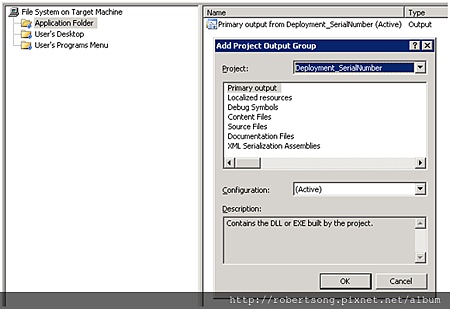
「Application Folder」-> 右鍵 ->「Add」->「專案輸出」;
選擇你的專案(含有 InstallerHelp class) -> 選「主要輸出」->「確定」。
Installer Porject 右鍵 ->「View」->「使用者介面」;
在「Start」右鍵 ->「加入對話方塊」-> 選擇「對話方塊(A)」->「OK」。
「對話方塊(A)」屬性
選擇哪幾個項目(Edit)要顯示給使用者輸入。
留意這裡的 Edit1Property 值,接下來會參考到。
Installer Porject 右鍵 ->「View」->「自訂動作」;
在「Install」點右鍵 ->「加入自訂動作」;
選擇你剛剛在「Application Folder」加入的專案。
打開 剛才加入的「主要輸出 from [你的專案名] (Active)」「屬性視窗」(右鍵);
「CustomerActionData」設定 /KeyValue=[EDITA1]。
( 安裝專案(右鍵) ->「View」->「自訂動作」)
這樣,你的程式就可以接收到 使用者在安裝畫面上 輸入的值了~。
Robert 發表在 痞客邦 留言(1) 人氣(3,526)

 TODO (2)