還是貼來源吧...
整合Eclipse和Tomcat:Sysdeo Eclipse Tomcat Launcher plugin
Sysdeo Eclipse Tomcat Launcher plugin
Robert 發表在 痞客邦 留言(0) 人氣(6)
如何設定 Eclipse 在編輯文字視窗中,中文字太小的問題:
選單上->"Window"->"Preferences"->"General"->"Appearance"->"Colors and Fonts"
->"Basic"->"Text Font"->"Edit"。
Robert 發表在 痞客邦 留言(0) 人氣(256)
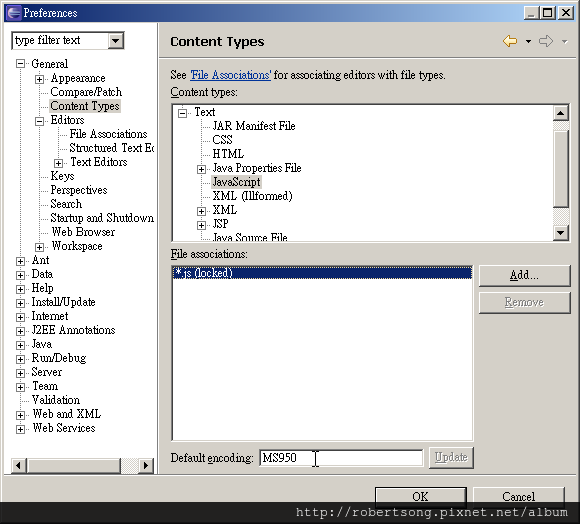
Eclipse 執行時如何讓Console顯示中文、建置全UTF-8的環境、針對個別檔案類型設定預設編碼
Eclipse 執行時如何讓Console顯示中文
Eclipse主功能表-->Run-->Run Configuration-->Common 頁籤-->
Console Encoding-->Others-->big5 (沒有就手動輸入)-->Apply
最後是印出正常的中文,但是這代表JDK應該是自己把它變成BIG5
所以導至設定成UTF-8的Console會印出亂碼!
建置全UTF-8的環境:
1.在eclipse.ini的-vmargs下面加上「-Dfile.encoding=UTF-8」。
2.eclipse-->Window-->Preferences-->General-->Workspace-->Text file encoding-->UTF-8
3.Installed JREs-->Default VM Arguments:-->-Dfile.encoding=UTF-8
4.eclipse-->Run-->Run Configurations-->Arguments-->VM arguments-->-Dfile.encoding=UTF-8
5.eclipse-->Run-->Run Configuration-->Common 頁籤--> Console Encoding-->Others-->UTF-8
==>亂碼!
5.eclipse-->Run-->Run Configuration-->Common 頁籤--> Console Encoding-->Others-->big5
==>ok!
Robert 發表在 痞客邦 留言(0) 人氣(4,692)
Preferences 的介面位置:
Eclipse neon jee 1a x64
"Windows" > "Preferences"
Robert 發表在 痞客邦 留言(0) 人氣(234)
按照自己常用的更新:
Alt + /
列出游標位置的自動完成清單。
Tab
反白區域向右縮排。
Shift + Tab
反白區域向左縮排。
Ctrl + (LeftClick 點擊名稱)
跳至宣告處。
Ctrl + (Hover)
快速跳至實作或宣告。
Alt + ← , Alt + →
快速至滑鼠所在的歷史位置。
Ctrl + Shift + o
移除沒用到的import。
Ctrl + O
快速至單一class中的成員。(含field、method)
Ctrl + T
打開class繼承階層。
Robert 發表在 痞客邦 留言(0) 人氣(656)
版本或安裝問題。
在「套件管理器主控台」(Package Manager Console)
執行:「Update-Package -reinstall Newtonsoft.Json」
Robert 發表在 痞客邦 留言(0) 人氣(309)
[Visual Studio 2012]
*.sln
Microsoft Visual Studio Solution File, Format Version 12.00
# Visual Studio 2012
Robert 發表在 痞客邦 留言(0) 人氣(1,071)

// TODO 待辦事項
Microsoft Visual Studio:選單列 ->「檢視」->「工作清單」。
Robert 發表在 痞客邦 留言(0) 人氣(181)
網址:http://kevintsengtw.blogspot.tw/2011/12/code-snippet-snippet-editor.html
Robert 發表在 痞客邦 留言(0) 人氣(187)

 TODO (2)